What is an AAC keyguard? When it helps and how to get one
An AAC keyguard is a sheet of rigid plastic with a hole cut over each button of a communication app. It sits on top of the tablet, so the person can rest their hand on it and press the button they mean without setting off the ones next to it.
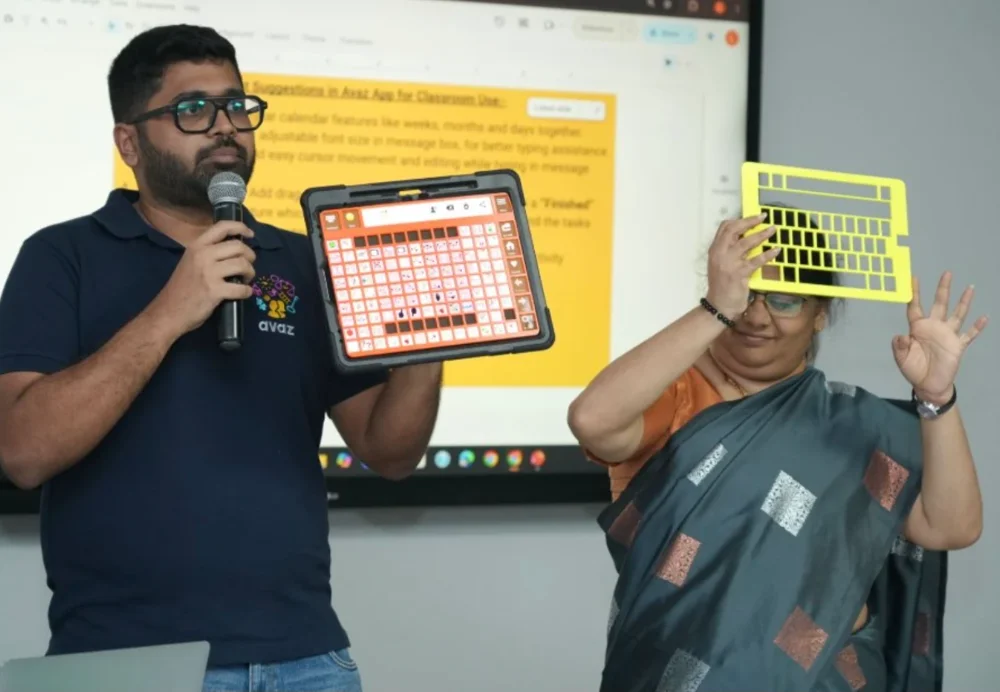
How a keyguard helps
Tablet screens react to the lightest touch. For someone who has difficulty with fine motor control, that makes a communication app hard to use: a hand resting on the glass, a finger that slides, or a tap that lands between two buttons all say the wrong word.
A keyguard changes that in a few ways:
- The bars between the openings take the weight of a resting hand or wrist, so only a deliberate press reaches the screen.
- Each opening gives the finger an edge to find, which makes it easier to land on the intended button and stay there.
- Buttons the person does not use yet can be covered, so they cannot be pressed by accident.
Keyguards are used by people of all ages, including people with cerebral palsy, tremor, or low muscle tone, and by people who use a pointer or a hand splint. A keyguard does not replace other access methods such as switches or eye gaze. It helps people who use touch but need more control over where that touch lands.
Signs it is time to try one
- The person often activates the button next to the one they reached for.
- Messages fill with repeated or unintended words because a finger stayed on the screen or slid across it.
- They hover above the screen and tire quickly because they cannot rest their hand.
- They avoid the device, or a communication partner has to steady the tablet or their arm.
If you notice these, talk to the person's speech-language pathologist or occupational therapist. They can also check whether a larger button size or a change in the app's touch settings would help, alone or together with a keyguard.
Keyguard vs touch guide
Both sit over the screen and both have one opening per button. The difference is the opening.
| Keyguard | Touch guide | |
|---|---|---|
| Openings | Usually rectangular, the size of each button | Usually smaller ovals |
| What the person sees | The whole picture and label of each button | The middle of each button |
| Good for | Stopping accidental presses while keeping every symbol in view | Guiding the finger to the centre of each button; some add raised markers you can feel |
Which one suits a person depends on their vision, their accuracy and how they move their hand. Many people start with a keyguard.
Fit matters more than anything
A keyguard only works if every opening sits exactly over its button. That ties it to three things:
- The page layout. A keyguard for a 6 × 10 grid will not fit an 8 × 10 grid of the same app.
- The tablet. Screen size and position differ between tablet models, even within one brand.
- The case. The case decides how the keyguard is held in place: some slide under the lip of the case, some clip on, some sit in a frame.
When any of these changes, the keyguard has to be remade. Before getting one, settle the grid size with the person's team, and note the exact tablet model (on an iPad, open Settings, then General, then About).
Ways to get a keyguard
| Option | Typical cost | Wait | Things to know |
|---|---|---|---|
| From the maker of a dedicated speech device | Varies by device | Shipping time | Made for that device and its standard layouts. Custom layouts usually need the number of rows, columns and buttons. |
| Made to order for a tablet and case | Around US$40 to $100 | Days to weeks | Usually cut for one app, grid and case combination, and usually cannot be returned once made. Some makers need to measure your case first. |
| 3D printed yourself | A few dollars of plastic | Hours | Needs a design that matches your layout exactly, and access to a 3D printer. Easy to reprint if it breaks or the layout changes. |
Printing your own is the quickest option to repeat, which matters because layouts change as a person's vocabulary grows. The hard part has always been the design: measuring the screen, counting the grid and entering every dimension by hand.
Make a keyguard from one screenshot. Take a screenshot of the app page on the tablet itself, pick the tablet from 315 models, and download a print-ready file cut to that exact layout. Free for personal use, with no account.
Make a keyguardThe steps, print settings and fitting tips are in how to 3D print a keyguard.
No 3D printer?
You do not need to own one. Many public libraries, schools, school districts, colleges and makerspaces have 3D printers you can use, often at little or no cost. You can also send the file to a local print shop.
Common questions
Does a keyguard work with any AAC app?
A keyguard is cut for one page layout on one tablet, so it works with whichever app shows that layout. If the app's grid size changes, or the tablet or case changes, the keyguard needs to be remade to match.
Does a keyguard stop someone learning to use the screen without one?
A keyguard can be lifted off or left off at any time. Many teams use it when accuracy matters most and try sessions without it as the person's access improves. Their speech-language pathologist or occupational therapist is the right person to plan that.
How do I clean a keyguard?
Take it off the tablet, wash it with mild soap and water or wipe it with a disinfectant safe for plastics, and let it dry fully before putting it back.
Can I edit the app while the keyguard is on?
Some settings and editing buttons sit outside the grid and may be covered. Lift the keyguard off while you edit, then put it back.
This guide is general information, not clinical advice. Decisions about access methods are best made with the person's speech-language pathologist or occupational therapist.